skyzr

Create a generic SORA: one authorisation for changing locations

With a generic SORA, you don't apply for your operational authorisation for a single flight area, but for all areas with the same or a lower risk. wingman checks whether your sample flight plans match, guides you through the SORA and, once you have the authorisation, checks every new flight area against the authorised risk.

Based on SORA 2.5, for Germany and Austria. New accounts can try all features for free.

This video is only loaded after consent. It is embedded from YouTube, which requires your consent to the “Marketing & Media” category.

References

These operators plan with wingman

SORA applications created with wingman have already been successfully submitted to the LBA and Austro Control. A selection of the drone operators planning with wingman.


KIONIQSpektakulAIRDronautix
The term explained

What is a generic SORA?

With a precise SORA, your authorisation applies exactly to the area you applied for. For every new location you need an amendment or a new application, and with changing jobs you keep waiting for the authority. A generic SORA assesses the risk of your operation based on several sample flight plans with the same risk. Every area that matches this risk or lies below it is then authorised.

Simplified comparison. The guide explains which rules the LBA and Austro Control apply in detail.
Precise SORAGeneric SORA
Flight areaone specific area, usually a single locationat least three sample flight plans with the same risk
Authorised forexactly this areaall areas with the same or lower risk within the authority's jurisdiction
Mitigations and proceduresdescribed for this locationapply to every declared area
New locationamendment of the authorisation or new applicationflight declaration: you check and document it yourself
Suitable forfixed sites and higher riskssimilar operations at changing locations, up to SAIL II

Guide: What is a generic SORA? (in German)

Is it right for you?

When a generic SORA pays off

A generic SORA is not a shortcut: the risk assessment follows the same method, and before every flight you check yourself whether the area fits. In return, you fly at new locations without applying for an authorisation each time.

Generic SORA

Pays off if …

  • you fly similar operations at changing locations, such as surveying, inspections or construction site documentation
  • your operations have a comparable, low risk and stay within SAIL II
  • your mitigations and procedures work the same at every location
  • you want to check and document yourself before every flight whether the area fits

Precise SORA

Is the better choice if …

  • you always fly at the same location, such as a factory site or a facility
  • your operation is above SAIL II
  • you fly over densely populated areas or near an airport
  • your safety measures are tailored to a specific location

Not sure which route suits your operation? Our SORA consulting supports you.

How it works

From three flight plans to a generic authorisation

wingman supports you from your first sample flight plan to operating at a new location.

  1. Upload flight plans

    You create a main flight plan and add at least two more flight plans from your day-to-day operations, uploaded or drawn in the risk map.

    three sample areas
  2. Match the risk

    wingman calculates the initial GRC, ARC and SAIL for each flight plan and compares every additional flight plan with the main flight plan.

    same risk
  3. Work through the SORA

    You go through the SORA as usual. Every mitigation and every procedure applies to all areas.

    SORA report
  4. Apply for the authorisation

    You apply to fly in all areas with the same or a lower risk.

    generic authorisation
  5. Declare new areas

    For every new location you create a flight declaration. wingman checks it, including your mitigations, against the authorised risk.

    checked and documented
Try it out

Which flight plans match?

A surveying company flies within visual line of sight with a multicopter under 1 m, up to 120 m altitude. The main flight plan and a second flight plan are set, there are several candidates for the third. Swap it and see what wingman reports when comparing it with the main flight plan.

Flight plan 3:

Field at the edge of a village

Terrain survey of a field, a few farms nearby.

GRC
3
ARC
ARC-b
SAIL
II

Reference for the comparison

Gravel pit

Volume measurement in the extraction area, a country road along the edge.

GRC
3
ARC
ARC-b
SAIL
II

matches the main flight plan

Timber yard at the edge of a forest

Inventory of a storage yard, a forester's house nearby.

GRC
3
ARC
ARC-b
SAIL
II

matches the main flight plan

Comparable

Both additional flight plans have the same risk as the main flight plan: GRC 3, ARC-b and SAIL II. All three are suitable as samples for your application.

Simplified example. wingman compares the initial risk, i.e. before mitigations. wingman calculates the actual risk of your areas from your flight plans, the population density and the airspace.

After the authorisation

New location? Flight declaration instead of a new application

With the generic authorisation, you check yourself whether a new area fits within the authorised limits. In wingman, you create a flight declaration for this. wingman checks the area, including your mitigations, against the authorised risk. Choose an area and see the result.

Your authorisation

Authorised risk from your generic SORA

GRC
up to 3
ARC
up to b
SAIL
up to II
  • mitigations and procedures as described in the application
  • applies to areas with the same or a lower risk
  • within the jurisdiction of the authority that issued it

New flight area:

Flight declaration: Storage yard of a sawmill

Example · checked against your authorisation

  • Mitigationsapplied as authorisedconsidered
  • Ground riskGRC 3 of max. 3within limits
  • Air riskARC-b of max. ARC-bwithin limits
  • SAILII of max. IIwithin limits

Within the authorised limits

The risk matches your authorisation. You can fly there.

Check and result saved in wingman, ready at hand for an audit.

Simplified example. As a rule, you don't send a flight declaration to the authority in advance, but it can request it during an inspection. What your authorisation requires in detail is stated in your notice of authorisation.

Right in wingman

How to create your generic SORA

You bring flight plans from your day-to-day operations. wingman matches them, calculates and keeps track of all areas.
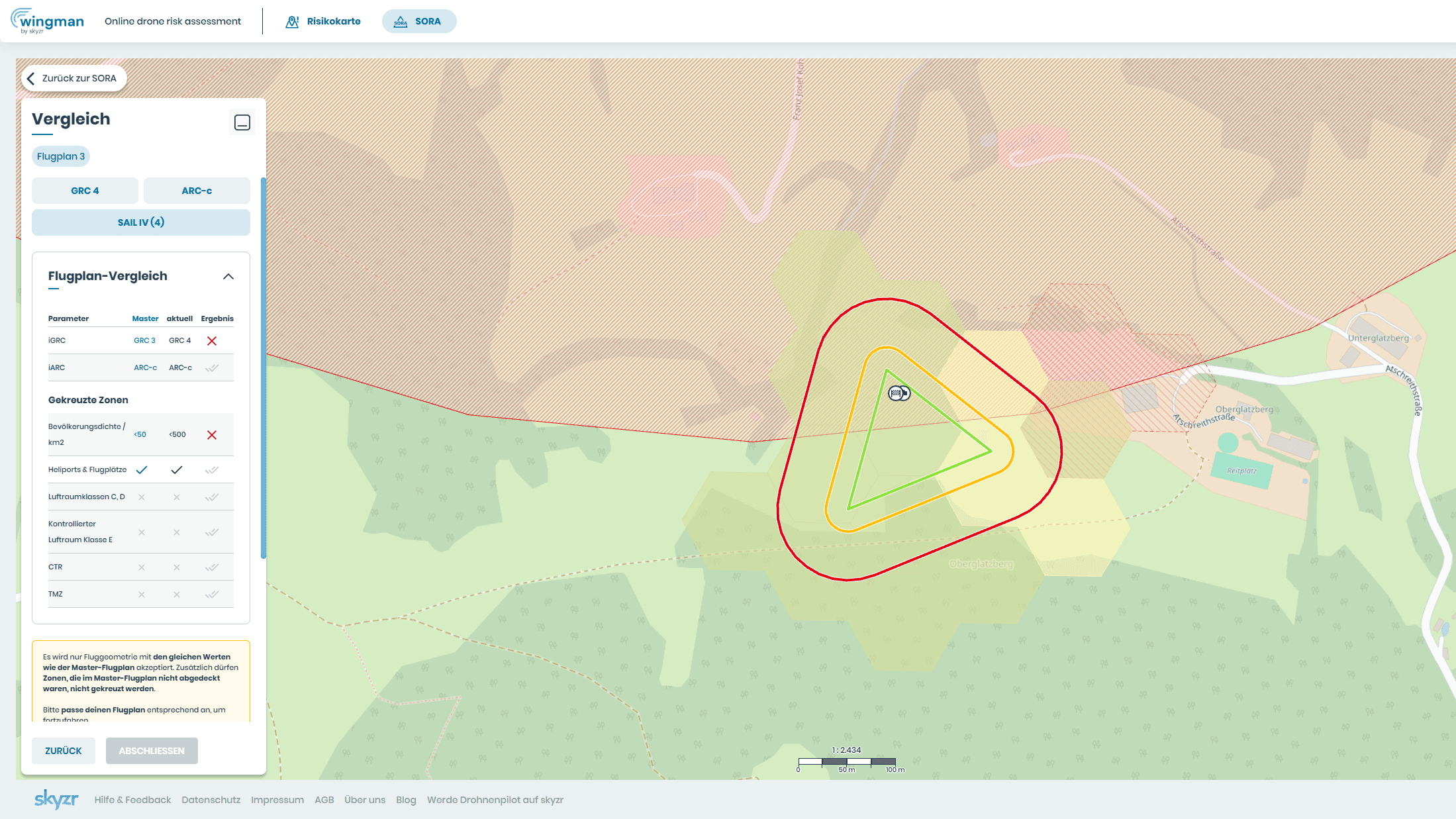
Flight plan comparison in wingman: an additional flight plan differs from the main flight plan in ground risk

Upload or draw sample flight plans

You upload your main flight plan and the additional sample flight plans or draw them in the risk map, which you also use to plan any other SORA in wingman. For each flight plan, wingman shows you ground risk, air risk and the SAIL.

wingman compares every additional flight plan with the main flight plan, value by value. If one doesn't match, you swap it before you spend time on the SORA.

One SORA for all declared areas

wingman then guides you through the complete SORA as usual, from the concept of operations to the Comprehensive Safety Portfolio. You define mitigations and procedures once, and they apply to all declared flight areas.

At the end you have a SORA report for your application. wingman also fills in the application form and the compliance matrix from the same details.
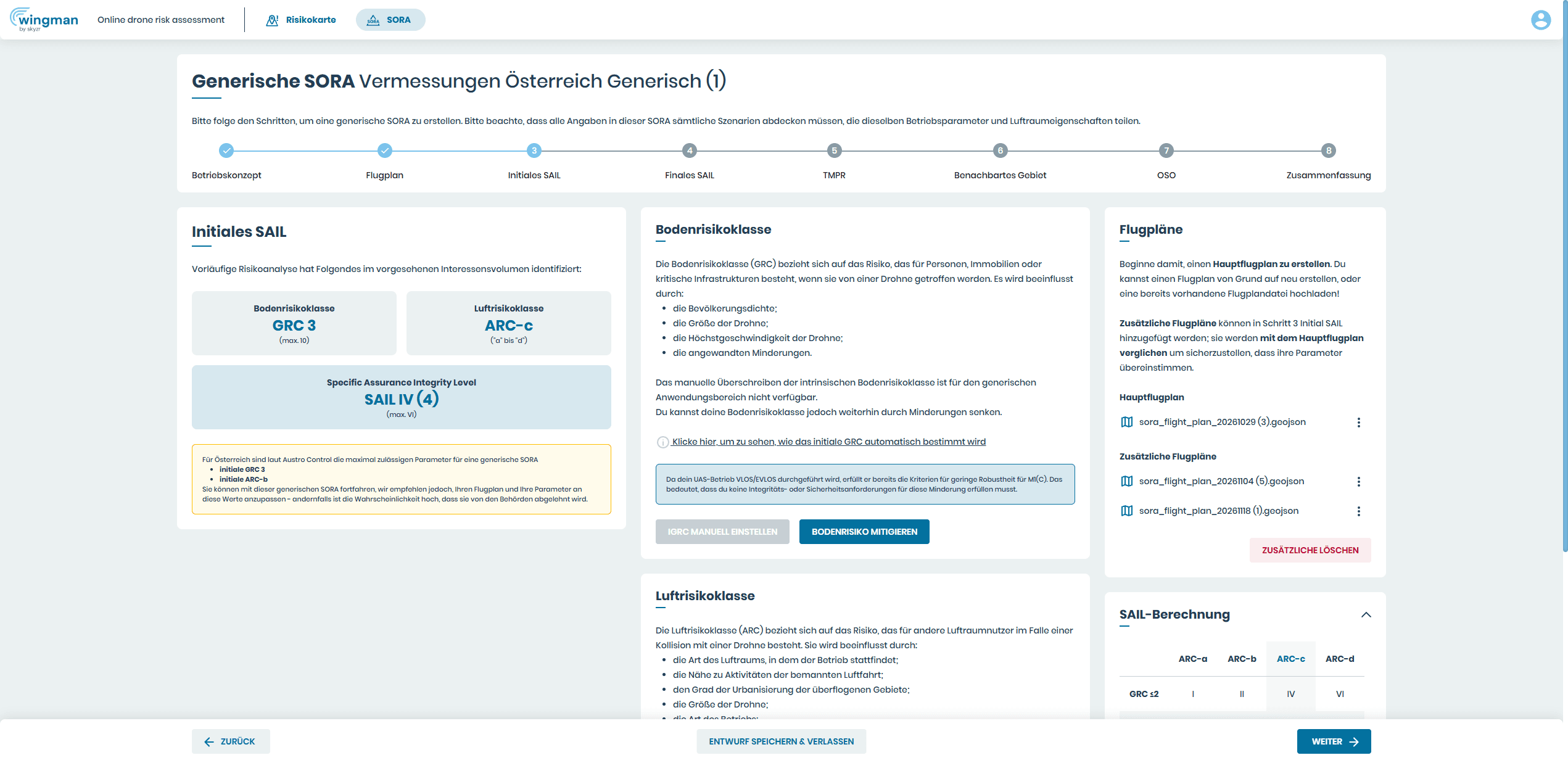
Generic SORA in wingman: initial SAIL with main flight plan and additional flight plans
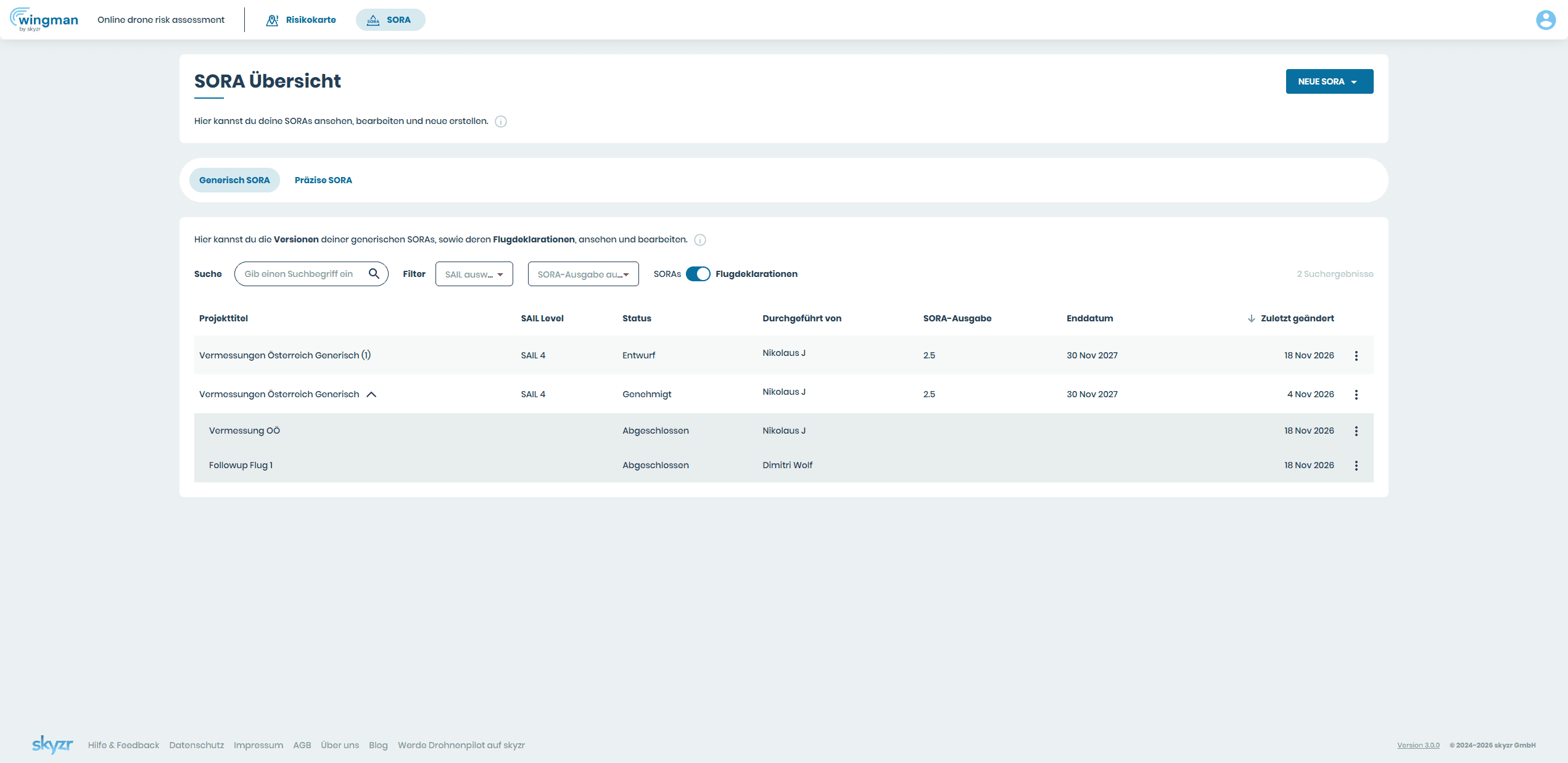
SORA overview in wingman: a generic SORA with its flight declarations

All flight declarations in one place

Your flight declarations stay saved in wingman with your generic SORA, each with its result. You can see at any time which areas you have already checked.

If the authority asks during an audit, you show it which areas you checked and with what result. You don't have to gather any evidence for that.

Why wingman?

A generic SORA you stay on top of

Done by hand, a generic SORA is mostly matching work: finding sample areas with the same risk, thinking through mitigations for every area and later checking and documenting every new location yourself.

  • Finding sample flight plans

    by hand
    determining and comparing GRC, ARC and SAIL individually for every candidate
    with wingman
    upload flight plans, wingman compares each one right away with the main flight planlearn more ->
  • Risk assessment

    by hand
    determining ground and air risk by hand for every sample area
    with wingman
    GRC, ARC and SAIL for all areas, automatically from route and dronelearn more ->
  • Mitigations and procedures

    by hand
    thinking through and describing every measure for every area individually
    with wingman
    define them once, wingman applies them to all declared areaslearn more ->
  • New location

    by hand
    checking population density, airspace and mitigations on site and comparing them with the notice
    with wingman
    create a flight declaration, wingman checks flight plan and mitigations against the authorised risk
  • Evidence

    by hand
    documenting every check yourself and filing it for an audit
    with wingman
    every flight declaration saved with its result and available instantly

Result

by hand
a lot of matching work before the application and before every new operation
with wingman
matching sample flight plans, one SORA for all areas and every new location documented
Transparent pricing

Pricing

Start for free and try all features. Here you can see what each plan includes.

  • Free

    Use our free features
    € 0
    • includedCreate & manage accounts
    • includedManage drones/assets
    • includedManage documents
    • includedUse the risk visualization map
    • not includedCreate SORA
    • not includedSave SORA drafts
    • not includedGenerate and share SORA export
    • not includedInvite multiple users
    • not includedSORA version control
    • not includedVersion change log
    • not includedCustomizations (on request)
    • not includedAPI integration (on request)
  • SPECIFIC Basic

    A must for SPECIFIC flights
    € 199/month€ 2189/yearPrices excl. VAT
    • includedCreate & manage accounts
    • includedManage drones/assets
    • includedManage documents
    • includedUse the risk visualization map
    • includedCreate SORA
    • includedSave SORA drafts
    • includedGenerate and share SORA export
    • not includedInvite multiple users
    • not includedSORA version control
    • not includedVersion change log
    • not includedCustomizations (on request)
    • not includedAPI integration (on request)
  • SPECIFIC Plus

    Full flexibility for your operation
    € 299/month€ 3289/yearPrices excl. VAT
    • includedCreate & manage accounts
    • includedManage drones/assets
    • includedManage documents
    • includedUse the risk visualization map
    • includedCreate SORA
    • includedSave SORA drafts
    • includedGenerate and share SORA export
    • includedInvite multiple users
    • includedSORA version control
    • includedVersion change log
    • not includedCustomizations (on request)
    • not includedAPI integration (on request)
Any questions?

Frequently asked questions about the generic SORA

Your question isn't listed? Write to us using the contact form or book a demo.

A generic SORA is a risk assessment under SORA that does not apply to a single flight area. You describe your operation using several sample flight plans with the same risk and apply to fly in all areas that match this risk or lie below it. Learn more in the guide What is a generic SORA? (in German).

A precise SORA refers to a specific, usually single flight area, and the authorisation only applies there. For every new location you need an amendment or a new application. A generic SORA applies to all areas with the same or a lower risk. In return, you check yourself before every operation whether the area fits.

The authorities require at least three flight plans with the same risk: the same GRC, the same ARC and the same SAIL. You describe your operation on this basis. In wingman, you create one of them as the main flight plan, and wingman compares the others with it.

wingman calculates the initial ground risk (GRC), the initial air risk (ARC) and from them the SAIL for each flight plan, i.e. before mitigations. wingman compares every additional flight plan with your main flight plan: the values must match, and an additional flight plan must not cross any zones that the main flight plan does not cross, such as airfields, heliports, control zones or controlled airspace. If something differs, wingman shows you which value or which zone it is.

Then you replace it with an area that matches the main flight plan. If its risk is higher, for example because of denser population or the proximity to an airfield, your generic SORA does not cover it. If it is lower, it is not suitable as a sample, because all flight plans must have the same risk as the main flight plan. You may still fly there after the authorisation.

For operations with a low risk, up to SAIL II according to EASA requirements. Typical are operations that are similar at changing locations, such as surveying, inspections or construction site documentation. The guide What is a generic SORA? (in German) explains which limits apply to ground and air risk.

In all areas that correspond to the same or a lower risk than in your authorisation, within the jurisdiction of the authority that issued it. An authorisation from Germany does not apply in Austria and vice versa.

Yes, and that is what matters. In a generic SORA, you must be able to implement every mitigation and every procedure at every declared flight area. That's why wingman always applies them to all areas. The page Apply mitigations shows how mitigations work in wingman.

You create a flight declaration in wingman for every new flight area once you have the generic authorisation. wingman checks the flight plan, taking your mitigations into account, against the authorised risk. If it is within the limits, you may fly there, and the check is documented.

As a rule, not in advance. However, the authority can request the documents during an inspection, such as an audit. You then show it the flight declarations from wingman with the result of every check. What applies to you exactly is stated in your notice of authorisation.

Yes. In Germany, the LBA explicitly describes the generic operational authorisation, and the FastFlight procedure (in German) usually grants authorisations generically. In Austria it is possible under EASA requirements, but Austro Control assesses every application individually. It's best to raise your plans there beforehand in the pre-application meeting.

Not necessarily for the application: the SORA follows the same method, and you calculate with the risk of your sample areas instead of an optimised single location. The advantage comes afterwards: for a new location you don't need a new application, just a flight declaration.

Yes. New accounts can try all wingman features for free, including the generic SORA. The pricing table above shows what each plan includes.

TRY IT FOR FREE

Personal contact

Prefer to talk in person? Niko shows you wingman

In the demo, Niko walks you through how to match your sample flight plans and create flight declarations in wingman. And if you have a question later, you won't be writing to an anonymous support desk but to a person who knows the tool and SORA.

Your contact

Nikolaus Jesch

Head of Operations

Niko shows you the generic SORA in wingman in a demo and answers your questions, from your first sample flight plans to choosing the right plan.

  • Demo
  • SORA application
  • Plans
  • Feedback

In the contact form, wingman is already selected as your topic.

More in wingman

What goes into your generic SORA

You also use these features for the generic SORA, for every declared area.

  • Interactive risk map

    Draw or upload flight plans, for every sample area.Learn more →
  • Calculate ground and air risk

    GRC, ARC and initial SAIL automatically from route and drone.Learn more →
  • Apply mitigations

    Choose measures, justify them and see their effect on the SAIL.Learn more →
  • SORA report

    The finished report for your application, with all calculations.Learn more →